nargil, what happens when you want to play the vanilla game again re those files you have to replace for the mod? Would the vanilla game work okay or would you need to reinstall the original files that you backed up?
The vanilla game or other modifications will work.
But the following will also work: If the user has replaced Engine.dll:
Missing Sound Fix.
If the user has replaced TQ.exe:
4GB Patch;
Show Life Leech Resist instead of Mana Leech Resist when the second inventory tab is open and Shift is held down;
Show overcapped resistances when the Ctrl key is held down;
Remembers the last selected difficulty when exiting to the Main Menu (for Play Titan Quest, not Play Custom Quest);
Fixed the Single Magical filter;
Enlarged the Caravan Transfer Area panel;
Colored Item Background for items with Failed Requirements;
Enabled Colored Item Background for Common Items.
If the user has replaced Game.dll (+guloadsim.dll):
Fixed the display of Pet Bonuses granted by a Complete Relic bonus when such a Relic is socketed in an item;
Fixed the display of skill levels in pet descriptions (on pet tooltips, the engine considers that +x to skills for the player also applies for pets. So with +x to skills your pet looks like it got +x twice);
Fixed the display of cooldowns for skills whose values may change at the next upgrade level;
Fixed cases where Relics would not combine if an attempt was made to merge them with a Relic already socketed in an item;
Fixed the cooldown for skills that have modifier skills interacting with the main skill's cooldown (skillCooldownTime) when such a modifier skill has not yet been learned;
Show Block Recovery Time for Shields;
Show Chance Pass Through Enemies (if the weapon has a non-zero chance).
Show buff/debuff full descriptions (when hovering the mouse over the buff/debuff icons in the top-left corner);
Show Skill descriptions on items when holding Shift;
Show the guaranteed Completed Relic/Charm Bonus when holding Alt - the bonus that would be obtained if the Relic or Charm were assembled directly within the item;
The character's main and bump textures always "reload" as soon as the Custom Maps modification loads (This fixes the "gray" character texture issue that occurs when a user enters the game with a character to which they have applied a dye that uses a texture present in a mod but absent from the base game).
Anything else that adds Game.dll + guloadsim.dll will not work in vanilla game, or in modifications (although, perhaps, other modifications may appear that can enable the functions they need, which are provided by these modified files, for example, you can enable the EnableMasteryReclamation parameter in a specific dbr file of the database and then Reclaim Mastery Points from Mystics will become available, which will also allow you to completely remove Mastery and replace it with another).
The mod has been updated and most likely won't cause crashes anymore. Two users who experienced crashes with the previous version are no longer having issues with the new one (we spoke with them on Discord). For those who didn't experience crashes with the previous version, I would still recommend updating to the new version.
The original BitmapCreator tool (BitmapCreator.exe) has several issues, and this modified file fixes them:
Clicking the "Save Icon" button causes the program to freeze permanently;
Clicking the "Load Layout" button causes the program to freeze permanently;
Clicking the "Save Layout" button causes the program to freeze permanently;
Clicking the "Batch" button causes the program to freeze permanently.*
* - In the original version, clicking this button should open a window prompting you to select a folder. Bitmaps of all DBR records located in the same folder as the currently open DBR record will be saved to this folder. In this modified version, you won't be prompted to select a save folder; instead, the file will always be saved to "C:\TQ_BitmapCreator\" (you'll need to manually create this folder, as if this folder doesn't exist, the program won't create it automatically and won't be able to save the result).
Tips: - Program Guide - https://titanquestfans.net/index.php?topic=776.0 - Image quality will depend on the game's graphics settings. Therefore, it's best to set all graphics settings to maximum before creating bitmaps. - I recommend disabling "Auto Zoom" before using the "Batch" button.
Make a backup copy of the original Engine.dll file (in the game's installation folder);
Unzip the modification archive to the game's installation folder.
Uninstallation:
Delete the modified Engine.dll;
Restore the original Engine.dll file.
Usage: Increases InGame UI only if [Options] -> [Graphics] tab -> "HUD Size" is set to "Medium" or "Large" (i.e. does not work if set to "Normal").
* - It was tested on these resolutions, but it doesn't mean that it doesn't work with other resolutions, and it also doesn't mean that if it works for other resolutions, there won't be bugs.
About: These modified files allow you to change the inventory size of merchants. This is NOT a standalone modification, but only a resource for other modders!
Game version: v2.10.21415 (all DLC).
Installation:
Add the new Template (.tpl) to the folder with the other Templates;
Make a backup copy of the original Game.dll file;
Replace the original Game.dll with the modified one;
Add guloadsim.dll to the game installation folder.
Usage:
Create "records\xpack\game\merchant_inventory.dbr" (this is the only path and record name that will work);
Change as needed (by default, the values are 256.0 and 448.0 for X and Y. This corresponds to the original 8x14 values (8×32 = 256 && 14×32 = 448)).
Spoiler for Video demonstration:
And again - this doesn't look good in the video because it's not a standalone, ready-made modification! You'll need to modify the UI yourself to accommodate the new dimensions!
Permissions: Feel free to use these files, just make sure to credit me.
About this mod: Fix for missing sounds when reloading the world multiple times.
Game version: v2.10.21415 (all DLC). WARNING: For some users, this modified file causes the game to crash when attempting to exit to the Main Menu. This doesn't happen to me, and I don't know why, so I likely won't be able to fix it. If your game crashes, please restore the original file.
Details The current version of the game has a sound bug that occurs when the world is restarted multiple times. This fix is suitable for users who farm a lot without fully restarting the game, but is pointless if you don't restart the world multiple times. For those who don't understand the description, here's a demonstration of the bug (at the end of the video, the sounds from the "Ice Shards" skill are missing):
Spoiler for Bug demonstration:
Here is a demonstration when the fix is installed:
Spoiler for Fix demonstration:
Installation:
Make a backup copy of the original Engine.dll file (in the game's installation folder);
Unzip the modification archive to the game's installation folder.
Uninstallation:
Delete the modified Engine.dll;
Restore the original Engine.dll file.
About Optional Files
Optional files are also available that allow you to reset the Initial Seed and/or Proxy Info. Why might this be necessary:
The game sets the Initial Seed once when you launch the game, and it won't change until you completely close the game and restart it. So, if you don't like the random (for example, if you're constantly getting the same items when farming a boss), with this modification you can reset the Initial Seed (as the game does at launch);
The game has a "Unified Proxy." In short, it's used to ensure that only a certain enemy type appears in a certain area of the map. Each time this "Unified Proxy" is initialized, it's saved until you completely restart the game. Below, under the spoiler, is a video with an example (no matter how many times I restarted the world, only Automatoi and Gorgons spawned in the same spot. But at the end of the video, I reset the Proxy Info and Limos, Skeletons, and Eurynomus spawned). This can be useful when you're farming a specific item and only need a specific enemy type. For example, when farming Stonebinder Cuffs (which drop from Gorgons) and you encounter Skeletons, with this modification you won't need to completely restart the game.
Spoiler for Proxy Info Reset Demonstration:
Usage In the Escape menu, when you click "Exit to Main Menu" and the message "Are you sure you wish to exit to the main menu?" appears, before clicking "Yes":
Hold down the Ctrl key and click "Yes." This will reset the Initial Seed. If you've done everything correctly, a message will appear saying "Seed value has been reset.";
Hold down the Shift key and click "Yes." This will reset the Proxy Info. If you've done everything correctly, a message will appear saying "Proxy info has been reset.";
Hold down the Ctrl + Shift keys and click "Yes." This will reset the Initial Seed and Proxy Info. If you've done everything correctly, a message will appear saying "Seed value has been reset. Proxy info has been reset.".
Can you attach the zip file of the mod to the message? The Nexus is unavailable.
I couldn't find a way to attach a file. Most likely, this feature is only available to moderators/administrators. I sent you a Google Drive link in a private message.
About this mod: Allows you to automatically pick up gold, potions and relics/charms (AutoLoot), as well as nearby items depending on the filter by pressing a button (QuickPickup).
Game version: v2.10.21415 (all DLC). Multiplayer support: No.
Installation:
Make a backup copy of the original Game.dll file (in the game's installation folder);
Unzip the modification archive to the game's installation folder.
Uninstallation:
Delete guloadsim.dll and guloadsim.ini;
Restore the original Game.dll file.
Usage: 1. Keyboard (if "GamepadMode" is set to 0 in the INI file):
If AutoLoot is enabled (if the "Enable" setting is set to 1 in the INI section "[AutoLootGeneral]"), it works automatically, and gold, potions, and relics/charms are automatically added to the inventory;
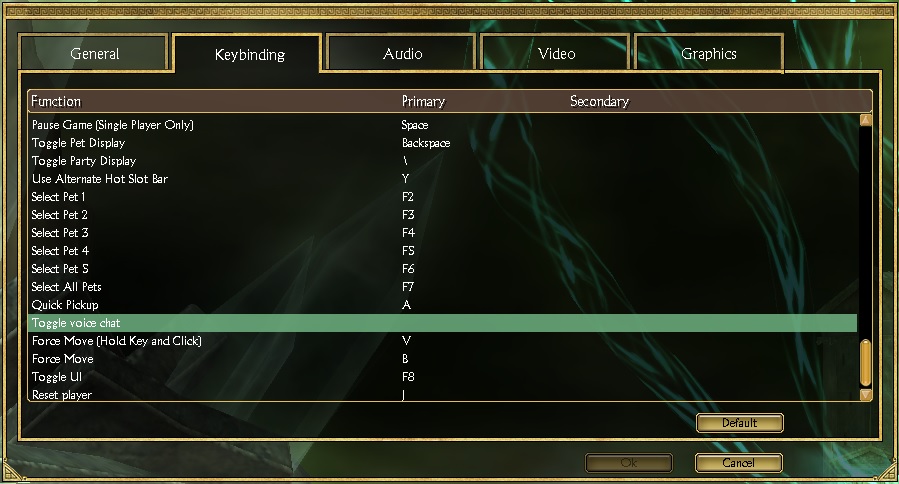
If QuickPickup is enabled (if the "Enable" setting is set to 1 in the INI section "[QuickPickupGeneral]"), pressing the key (specified in the "QuickPickupKey" INI file; by default, this is the "A" key) will pick up all items within the "QuickPickupDistance" radius, depending on the current "filter" (preset);
If QuickPickup is enabled, pressing "Ctrl" + "QuickPickupKey" (from the INI file) will execute "Force QuickPickup." This will also pick up items that haven't yet completely stopped moving (the text you can click to pick up an item is not visible);
To change the active preset, press the key specified in "ChangePresetKey" (by default, this is the "]" key). If "ChangePresetSound" is enabled, a sound will play as if you sold or bought an item from a merchant;
If the "OpenContainers" setting in the "[QuickPickupGeneral]" section of the INI file is set to 1, pressing the key (specified in the "OpenContainersKey" in the INI file, by default, this is the "A" key) will open all chests within the "OpenContainersDistance" radius.
2. Gamepad (if "GamepadMode" is set to 1 in the INI file):
If AutoLoot is enabled (if the "Enable" setting is set to 1 in the INI section "[AutoLootGeneral]"), it works automatically, and gold, potions, and relics/charms are automatically added to the inventory;
If QuickPickup is enabled (if "Enable" is set to 1 in the INI section "[QuickPickupGeneral]"), pressing "LT" + "A" will pick up all items within the "QuickPickupDistance" radius, depending on the current "filter" (preset);
If QuickPickup is enabled, pressing "LT" + "RT" + "A" (from the INI file) will execute "Force QuickPickup." This will also pick up items that haven't yet completely stopped moving (the text you can click to pick up an item is not visible);
To change the active preset, hold down "LT" + "RT" for one second. If "ChangePresetSound" is enabled, a sound will play as if you sold or bought an item from a merchant;
If the "OpenContainers" setting is set to 1 in the "[QuickPickupGeneral]" section of the INI, pressing "LT" + "A" will open all chests within the "OpenContainersDistance" radius.
Settings (INI file): The following parameters are available in the settings file (guloadsim.ini): 1. [AutoLootGeneral] Section:
"Scroll" (Default: 1 | 1) - Enables/Disables picking up scrolls.
Notes:
Assigning the "QuickPickupKey," "OpenContainersKey," and "ChangePresetKey" keys does NOT "lock" these keys for the game! Therefore, if, for example, you have assigned the "QuickPickupKey" to the "C" key, and you also have the "C" key set to open the inventory window in the game settings, pressing the key will execute QuickPickup and open the inventory;
The "QuickPickup" function from this modification is not related to the in-game "Quick Pickup," meaning the "QuickPickupKey" from the INI file may not correspond to the key assigned to "Quick Pickup" in the game's control settings. I would also recommend (this is not required) disabling or changing the key for the in-game "Quick Pickup" function if it corresponds to the "QuickPickupKey" from this modification;
"Force QuickPickup" mode (more details in the "Usage" section) allows you to pick up items that don't yet have text prompts. This is useful for situations where you know an item has dropped (for example, you can see on the minimap that it's a legendary item) and it's unavailable for pickup for a long time (experienced Titan Quest players will understand what I mean);
I hope it works with all gamepads. I only tested it with an xinput gamepad;
The minimum value of "QuickPickupDistance" is 1.0, and the maximum is 25.0;
The minimum value of "OpenContainersDistance" is 1.0, and the maximum is 7.5;
If there is no settings file (INI file), or it does not contain all the settings, or the modification cannot for some reason get some settings from the INI file, then the default settings will be enabled.
If you want to choose the distance for yourself, here is a demonstration of the distance to the item:
Spoiler for Distance To Item Test:
If anyone tries it with Steam Deck, let me know if it works (remember to change "GamepadMode" to 1).
There aren't any special settings. I just recommend set shadows to any value other than "Off," as this can cause visual bugs for some players. You can also apply the "4GB Patch" (read about it on the Internet). This is especially important if you're playing with any modifications.
set "SkipIfAlreadyExist=0" set "DeleteOriginalAfterConversion=1"
set "ShowSkipped=1" set "ShowDeleted=1"
REM Check if texconverter-cli.exe is in the folder with the batch file set "TexConverter=%~dp0texconverter-cli.exe" if not exist "%TexConverter%" ( echo "%TexConverter% does not exist!" goto :EXIT )
REM Check if the arguments have been passed if "%~1"=="" ( echo Error: No arguments passed! goto :EXIT )
REM Processing each argument for %%A in (%*) do ( if exist "%%A" ( REM If argument is folder if exist "%%A\*" ( call :processFolder "%%A" ) else ( REM If argument is file
REM Check if .dds or .DDS extension set "isDDS_file=0" if "%%~xA" == ".dds" ( set "isDDS_file=1" ) if "%%~xA" == ".DDS" ( set "isDDS_file=1" )
if "!isDDS_file!" == "1" ( REM If TEX file already exist if exist "%%~dpnA.tex" ( if "%SkipIfAlreadyExist%"=="1" ( if "%ShowSkipped%"=="1" ( echo "%%A" skipped. ) ) else ( REM Delete TEX that already exist del /F /Q "%%~dpnA.tex"
if "%ShowDeleted%"=="1" ( echo "%%~dpnA.tex" DELETED. )
REM Convert "%TexConverter%" -i "%%A" -o "%%~dpnA.tex"
REM If the conversion was completed without errors, REM and converted file exist (its possible, that texconverter-cli.exe will complete without errors but will not create a converted file), REM and original file deletion is enabled if !ERRORLEVEL!==0 if exist "%%~dpnA.tex" if "%DeleteOriginalAfterConversion%"=="1" ( del /F /Q "%%A"
if "%ShowDeleted%"=="1" ( echo "%%A" DELETED. ) ) ) ) else ( REM If TEX file not already exist, then just convert "%TexConverter%" -i "%%A" -o "%%~dpnA.tex"
REM If the conversion was completed without errors, REM and converted file exist (its possible, that texconverter-cli.exe will complete without errors but will not create a converted file), REM and original file deletion is enabled if !ERRORLEVEL!==0 if exist "%%~dpnA.tex" if "%DeleteOriginalAfterConversion%"=="1" ( del /F /Q "%%A"
if "%ShowDeleted%"=="1" ( echo "%%A" DELETED. ) ) ) ) else ( echo Error: %%A not have .dds extension! ) ) ) else ( echo Error: %%A not exist! ) )
echo: echo Done^! goto :EXIT
:processFolder REM For all DDS files in folder (with subfolders) for /r "%1" %%F in (*.dds) do ( REM If TEX file already exist if exist "%%~dpnF.tex" ( if "%SkipIfAlreadyExist%"=="1" ( if "%ShowSkipped%"=="1" ( echo "%%F" skipped. ) ) else ( REM Delete TEX that already exist del /F /Q "%%~dpnF.tex"
if "%ShowDeleted%"=="1" ( echo "%%~dpnF.tex" DELETED. )
REM Convert "%TexConverter%" -i "%%F" -o "%%~dpnF.tex"
REM If the conversion was completed without errors, REM and converted file exist (its possible, that texconverter-cli.exe will complete without errors but will not create a converted file), REM and original file deletion is enabled if !ERRORLEVEL!==0 if exist "%%~dpnF.tex" if "%DeleteOriginalAfterConversion%"=="1" ( del /F /Q "%%F"
if "%ShowDeleted%"=="1" ( echo "%%F" DELETED. ) ) ) ) else ( REM If TEX file not already exist, then just convert "%TexConverter%" -i "%%F" -o "%%~dpnF.tex"
REM If the conversion was completed without errors, REM and converted file exist (its possible, that texconverter-cli.exe will complete without errors but will not create a converted file), REM and original file deletion is enabled if !ERRORLEVEL!==0 if exist "%%~dpnF.tex" if "%DeleteOriginalAfterConversion%"=="1" ( del /F /Q "%%F"
4. Create .bat file (with any name) in folder where texconverter-cli.exe and paste:
Spoiler for _TEX TO DDS.bat:
@echo off setlocal EnableDelayedExpansion
set "SkipIfAlreadyExist=0" set "DeleteOriginalAfterConversion=1"
set "ShowSkipped=1" set "ShowDeleted=1"
REM Check if texconverter-cli.exe is in the folder with the batch file set "TexConverter=%~dp0texconverter-cli.exe" if not exist "%TexConverter%" ( echo "%TexConverter% does not exist!" goto :EXIT )
REM Check if the arguments have been passed if "%~1"=="" ( echo Error: No arguments passed! goto :EXIT )
REM Processing each argument for %%A in (%*) do ( if exist "%%A" ( REM If argument is folder if exist "%%A\*" ( call :processFolder "%%A" ) else ( REM If argument is file
REM Check if .tex or .TEX extension set "isTEX_file=0" if "%%~xA" == ".tex" ( set "isTEX_file=1" ) if "%%~xA" == ".TEX" ( set "isTEX_file=1" )
if "!isTEX_file!" == "1" ( REM If DDS file already exist if exist "%%~dpnA.dds" ( if "%SkipIfAlreadyExist%"=="1" ( if "%ShowSkipped%"=="1" ( echo "%%A" skipped. ) ) else ( REM Delete DDS that already exist del /F /Q "%%~dpnA.dds"
if "%ShowDeleted%"=="1" ( echo "%%~dpnA.dds" DELETED. )
REM Convert "%TexConverter%" -i "%%A" -o "%%~dpnA.dds"
REM If the conversion was completed without errors, REM and converted file exist (its possible, that texconverter-cli.exe will complete without errors but will not create a converted file), REM and original file deletion is enabled if !ERRORLEVEL!==0 if exist "%%~dpnA.dds" if "%DeleteOriginalAfterConversion%"=="1" ( del /F /Q "%%A"
if "%ShowDeleted%"=="1" ( echo "%%A" DELETED. ) ) ) ) else ( REM If DDS file not already exist, then just convert "%TexConverter%" -i "%%A" -o "%%~dpnA.dds"
REM If the conversion was completed without errors, REM and converted file exist (its possible, that texconverter-cli.exe will complete without errors but will not create a converted file), REM and original file deletion is enabled if !ERRORLEVEL!==0 if exist "%%~dpnA.dds" if "%DeleteOriginalAfterConversion%"=="1" ( del /F /Q "%%A"
if "%ShowDeleted%"=="1" ( echo "%%A" DELETED. ) ) ) ) else ( echo Error: %%A not have .tex extension! ) ) ) else ( echo Error: %%A not exist! ) )
echo: echo Done^! goto :EXIT
:processFolder REM For all TEX files in folder (with subfolders) for /r "%1" %%F in (*.tex) do ( REM If DDS file already exist if exist "%%~dpnF.dds" ( if "%SkipIfAlreadyExist%"=="1" ( if "%ShowSkipped%"=="1" ( echo "%%F" skipped. ) ) else ( REM Delete DDS that already exist del /F /Q "%%~dpnF.dds"
if "%ShowDeleted%"=="1" ( echo "%%~dpnF.dds" DELETED. )
REM Convert "%TexConverter%" -i "%%F" -o "%%~dpnF.dds"
REM If the conversion was completed without errors, REM and converted file exist (its possible, that texconverter-cli.exe will complete without errors but will not create a converted file), REM and original file deletion is enabled if !ERRORLEVEL!==0 if exist "%%~dpnF.dds" if "%DeleteOriginalAfterConversion%"=="1" ( del /F /Q "%%F"
if "%ShowDeleted%"=="1" ( echo "%%F" DELETED. ) ) ) ) else ( REM If DDS file not already exist, then just convert "%TexConverter%" -i "%%F" -o "%%~dpnF.dds"
REM If the conversion was completed without errors, REM and converted file exist (its possible, that texconverter-cli.exe will complete without errors but will not create a converted file), REM and original file deletion is enabled if !ERRORLEVEL!==0 if exist "%%~dpnF.dds" if "%DeleteOriginalAfterConversion%"=="1" ( del /F /Q "%%F"
Now you can convert DDS to TEX and TEX to DDS by drag&dropping the required files and/or folders onto the corresponding .bat file. At the beginning of each .bat file there is:
Spoiler for Settings:
set "SkipIfAlreadyExist=0" set "DeleteOriginalAfterConversion=1"
set "ShowSkipped=1" set "ShowDeleted=1"
And you can change the "settings" at your discretion (changing from 0 to 1 or from 1 to 0).
Spoiler for Settings description:
SkipIfAlreadyExist: Set to 1: If during conversion (e.g. DDS to TEX) it is found that there is already a corresponding TEX file for such DDS, then simply ignore (skip) such file. Set to 0: If during conversion (e.g. DDS to TEX) it is found that there is already a corresponding TEX file for such DDS, the TEX file will be first deleted and then converted again.
DeleteOriginalAfterConversion: Set to 1: When the conversion is successful (only successful) (e.g. DDS to TEX) the original file is deleted (i.e. the DDS file will be deleted and only the converted TEX file will remain). Set to 0: Never delete the original file after conversion.
ShowSkipped: Set to 1: Messages will be shown about which files were skipped. Set to 0: No messages will be shown about which files were skipped.
ShowDeleted: Set to 1: Messages will be shown about which files were deleted. Set to 0: No messages will be shown about which files were deleted.
Notes: 1. You can drag&drop several folders/files onto a .bat file at the same time. And also both files and folders at the same time. 2. If you want to convert a folder, then files from other subfolders of this folder will always be converted. 3. Works correctly only if the file extension is .dds/.tex or .DDS/.TEX (i.e. if the extension is .Tex or .dDs, it will not work). 4. You can create a shortcut for the .bat file(s) and place them anywhere. Drag&drop on such a shortcut will also work.
 Show Posts